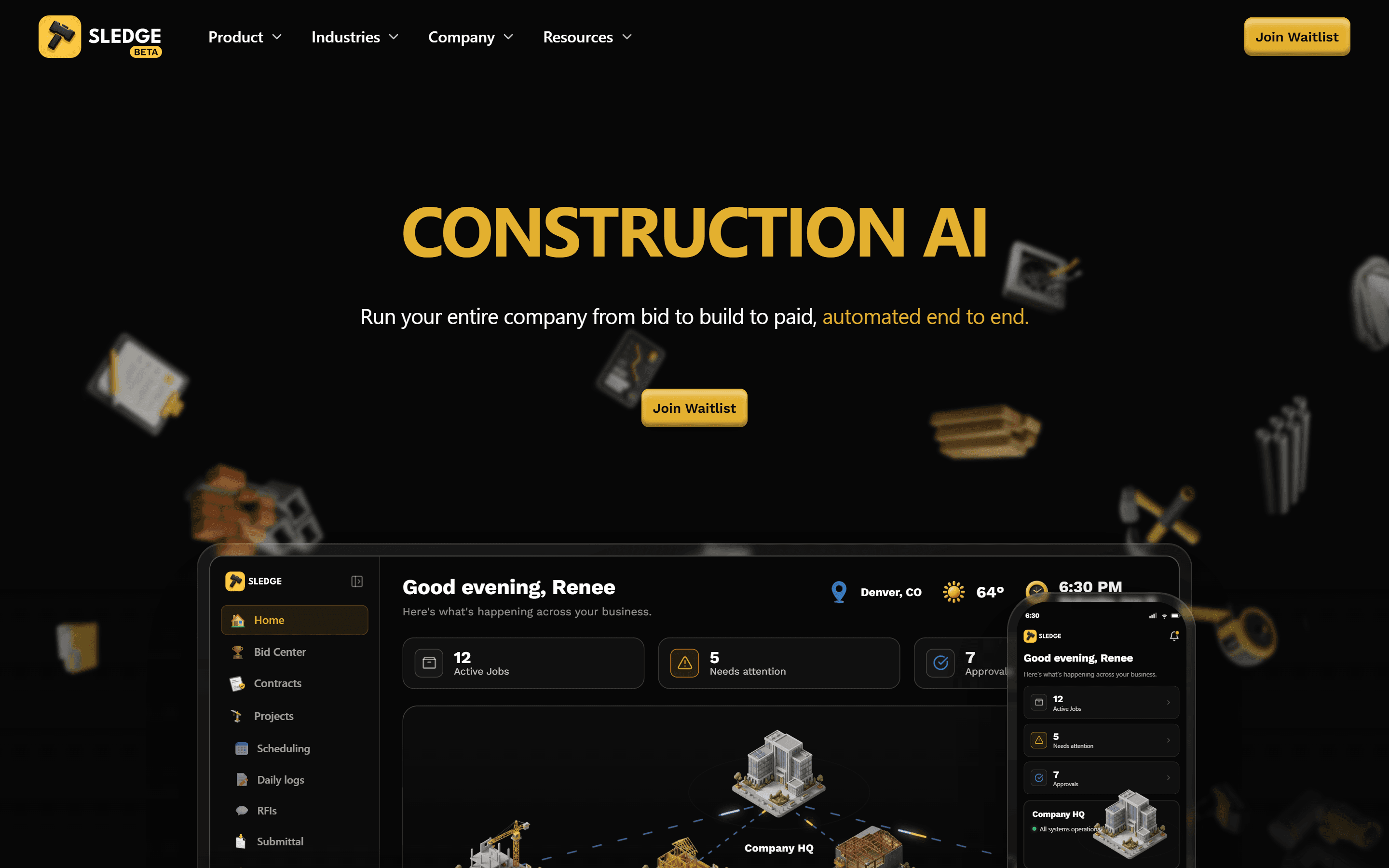
Sledge is a construction AI platform that helps construction companies run their business from bid to build to paid. I work on it as a full-stack engineer in a team, building product features and features of Fiona, its AI assistant, which answers questions about company data and only changes anything after the user approves it. The public stack is Next.js, React, TypeScript, Node.js, PostgreSQL and OpenAI.
The problem
A construction company runs each job through a long trail of paperwork: bids and estimates, contracts that need signing, schedules, invoices and progress billing, compliance documents. Sledge brings that trail into one product, and Fiona sits on top of it so someone can ask about their own data, or ask for something to be done, in plain language instead of hunting through screens.
An assistant in this setting carries real risk. Contract values, invoice amounts and schedule dates have money and obligations attached, so a change nobody asked for can cost someone money. A value read out of a document is only useful if the user can check it quickly, otherwise they re-read the document anyway. The product work I took on kept coming back to the same question: what does a contractor need to see before trusting what the assistant did?
My role
Sledge is my employer's product. I joined the team as a Full Stack Engineer in June 2026, and I contribute to product features and to the assistant. This is professional work on a team product, so I did not design the platform alone, and this page covers only user-visible features I built.
For the same reason it leaves out how Sledge works internally. The decisions below are the ones a user can see on screen, and why they matter for people running construction jobs.
Architecture and tech stack
The assistant asks before it changes anything
Fiona can answer questions about company data and carry out actions across the product, but any change waits for the user to approve it. Reading is cheap and safe, writing is not. A contractor should never discover that a figure on a contract or invoice moved because a model misread a request, so the assistant proposes and the person who owns the record decides.
Extraction that shows where each value came from
When the AI pulls values out of a document, each one points back to the place in the source document it came from. Without that, checking an extracted figure means scanning the whole file, which removes most of the time the feature was meant to save. With it, verifying a value is a glance.
Answers that lead to the record
Documents are shown inline in the chat, and answers link to the records they mention. After an answer about a job or an invoice, the user can open the actual record in one click, check it, and act on it there.
Figma as the reference for product screens
I built the e-signature flow, the Settings area, the waitlist page and the transactional email templates from Figma designs. Matching the design closely keeps a product with many modules feeling like one system, the same discipline I applied on a pixel-accurate React client build from Figma. Email was the stricter half, because a template has to hold up across mail clients rather than one browser, a different problem from the campaign sending in my MERN Mail email manager.
Key features
- Answers from company data: Fiona responds to questions about the company's own records.
- Actions with approval: the assistant can act across the product, and the user approves each change before it happens.
- Explainable document extraction: every extracted value shows where it came from in the source document.
- Documents in the conversation: files appear inline in chat, and answers link to the records they mention.
- PDF-to-schedule import: a schedule that arrives as a PDF can be brought into the product.
- Company-wide schedule templates that can be reused across jobs.
- Product UI built from Figma: e-signature, Settings, the waitlist page and transactional email templates.
Challenges and how I solved them
Approval that people will actually use
- Problem
- A confirmation step protects the user, but if it gets in the way people stop asking the assistant to do anything, and the feature quietly dies.
- Solution
- The approval sits where the request was made, so the user sees what the assistant intends to change and says yes or no without leaving the conversation. Answering questions needs no approval at all, so the check only appears when something is about to change.
Trusting a number read from a PDF
- Problem
- Construction documents are dense, and a single wrong value pulled from one can travel into a contract or an invoice. An extracted number with no visible origin asks the user to trust the model blindly.
- Solution
- Each value carries a pointer to where it was found in the source, so the user can confirm it against the original before relying on it.
Getting schedules out of PDFs
- Problem
- Schedules often exist as PDFs, and retyping every line into a new tool is the kind of setup work that stops people adopting it.
- Solution
- PDF-to-schedule import brings an existing schedule in, and company-wide schedule templates let a company set up a familiar structure once and reuse it on the next job.
Results
Sledge is in beta, with a public waitlist at getsledge.com; the waitlist page is one of the screens I built. The assistant features, document extraction, schedule import and templates described here are part of the product. Where AI is involved, it shows where its answer came from, and the user keeps the final say over any change.
What's next
I am continuing to work on product features and on Fiona as Sledge moves through its beta.