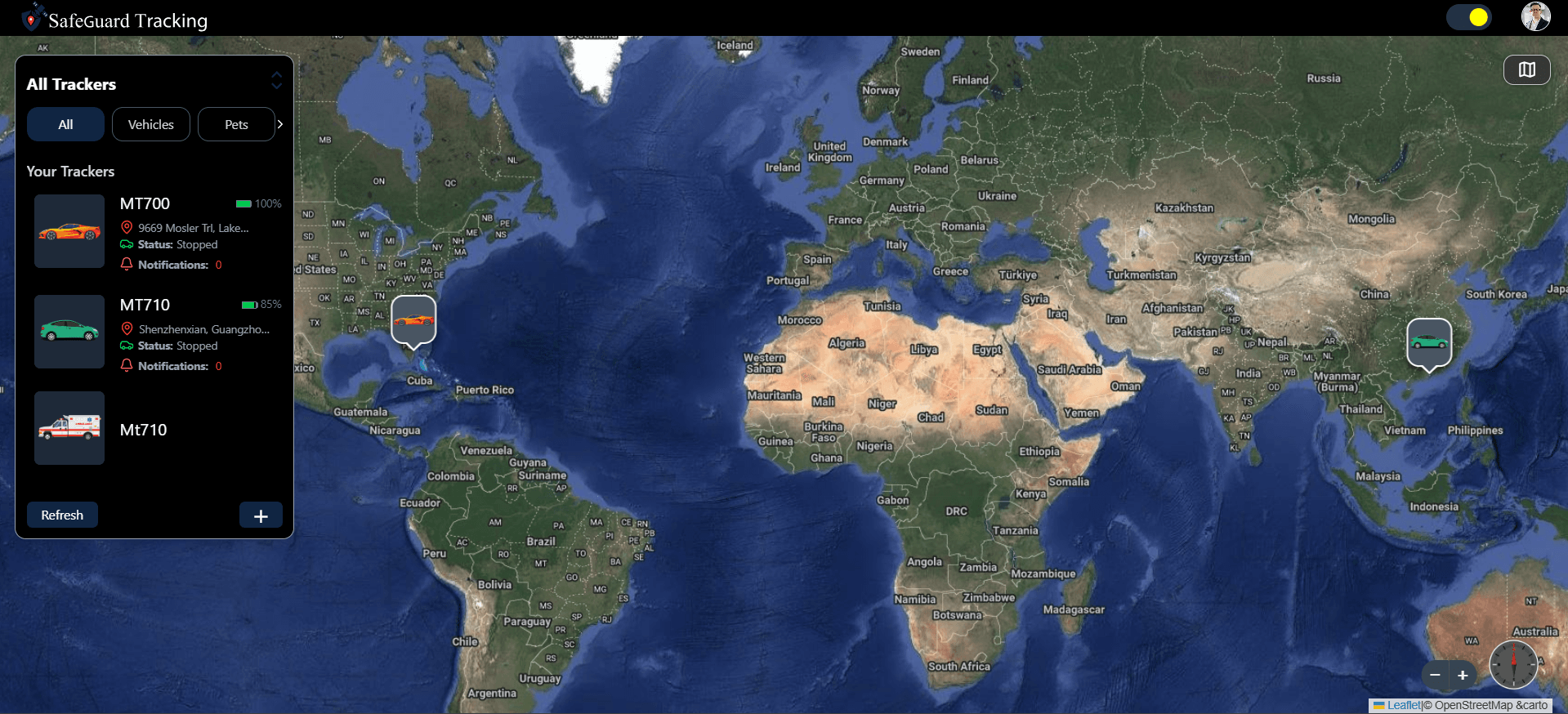
SafeGuard Tracking is a real-time GPS tracking dashboard I built in React and TypeScript for monitoring and managing tracker devices on a map. Live positions arrive over Socket.IO, history and settings come through REST APIs, and alerts reach the user through Firebase Cloud Messaging, including geofence entry and exit, with route history and device controls in the same interface.
The problem
A GPS tracker is only as useful as the screen that reads it. Someone responsible for a tracker device wants three answers quickly: where is it now, where has it been, and has anything happened that needs attention. If the position on the map is a minute stale, or a boundary alert only shows up the next time they open the page, the device has not done its job.
Those answers come from data with very different timing. A current position changes every few seconds. A route history over the last day is a large, settled dataset. An alert is rare and urgent, and it matters most when the dashboard is not even open. The task was to build one frontend that handled all three without making the user think about where each piece of information came from.
My role
I built the frontend application in React and TypeScript: the map interface and live markers, route history and direction mapping, the alerts and notification centre, tracker management screens, geofencing UI, and the full authentication flow with login, signup and OTP verification. The client talks to a backend through REST APIs and a Socket.IO connection, and receives push notifications through Firebase Cloud Messaging.
Architecture and tech stack
Socket.IO for live positions, REST for everything settled
Polling an endpoint every few seconds for every device would waste requests and still lag behind. Location updates come in over a Socket.IO connection and move the marker as they arrive. Data that is fetched once and then read, such as movement history for a chosen time range, device settings and the account, stays on ordinary REST calls, which are simpler to cache, retry and reason about.
On the server side of real-time work, I used Socket.io for live chat and notifications in the Cyborg Gaming backend. Working on the client here meant handling the same kind of event stream from the receiving end.
Firebase Cloud Messaging with a service worker
A socket only helps while the page is open. A tracker crossing a geofence at night still needs to reach its owner, so alerts are also delivered as Firebase push notifications, and a service worker receives them when the dashboard is closed or in a background tab. Inside the app, the same alerts land in a notification list with unread tracking.
Context API and custom hooks for shared state
The state that many screens share is small and well defined: the session, the list of trackers and their latest status, and the notifications. React Context holds those, and custom hooks wrap the socket subscriptions and data fetching, so a map or a device card asks a hook for data and only deals with displaying it.
One module for every API call
All requests go through a central API layer that attaches the session, handles errors in one place and keeps endpoint paths out of components. The session itself persists in Local Storage, so a refresh or a returning visit does not force another login.
Key features
- Live device tracking: markers move on the map as Socket.IO position updates arrive.
- Route history with direction mapping, so a past journey reads as a path with a clear heading.
- Movement history for a selectable time range.
- Geofencing with alerts when a tracker enters or leaves a boundary.
- Alerts and push notifications through Firebase Cloud Messaging, with unread tracking in the app.
- Tracker management for device status, battery level and settings.
- Authentication with login, signup, OTP verification and a persisted session.
Challenges and how I solved them
Two channels describing one device
- Problem
- A device card can be fed by a REST response when the page loads and by socket events after that. If the two are kept in separate places, the battery level in the list and the marker on the map can disagree about the same tracker.
- Solution
- Both sources write into the same shared tracker state held in Context. The initial REST load fills it, socket updates patch it, and every component reads from that single copy, so the list and the map always show the same device.
An alert the user has already seen
- Problem
- The same geofence event can surface as a push notification, as a live event in the open app and as an entry in the notification list. Counting it as unread in all three places would make the badge meaningless.
- Solution
- Unread status is tracked per notification in one place, and the badge is derived from that list. Opening the notification centre or the alert itself marks it read, whichever way the user first met it.
History that stays readable
- Problem
- A day of position reports is a long list of coordinates. Drawn naively, a route turns into a tangle that tells the user little about where the device actually went.
- Solution
- History is requested for a time range the user picks and drawn as a route with direction mapping, so the order of travel is visible and a short range answers a specific question quickly.
Results
SafeGuard Tracking gives a tracker owner one screen for the live position, the route behind it, the state of each device and every alert, with notifications that still arrive when the dashboard is closed. The modular structure, with state in Context, logic in hooks and requests in one API module, kept new screens such as geofencing from reaching into the internals of the map. A similar split between screens and shared data runs through MedSalve, my pharmacy dashboard frontend, though there the data is mock rather than live.
What's next
Possible next steps include richer geofence shapes and exporting movement history, though these are ideas rather than committed plans.