The Knowledge-Based Article Management System is a PHP knowledge base management system I built for organisations that publish and maintain help articles, such as businesses, educators and knowledge-sharing communities. Admins write, categorise, archive and remove articles, while customers find and read them. It runs on PHP and MySQL, with Bootstrap and AJAX on the front end and protection against SQL injection and XSS.
The problem
Help content tends to collect in the wrong places. Answers to common questions sit in old emails, in a shared drive full of documents with nearly identical names, or in the memory of whoever has been around longest. When someone needs an answer they ask a colleague, and the same question gets answered over and over.
A knowledge base only fixes that while it stays maintained. Articles go out of date; deleting them outright throws away history that might still matter, and leaving them up misleads readers. The people writing the content also need a different view of the system from the people reading it. Most of the design effort therefore went into managing an article across its whole life, with publishing as one stage of it.
My role
I built the application end to end: the MySQL schema, the PHP logic for articles, categories, users and search, the admin and customer dashboards, and the Bootstrap and JavaScript interface. Working in PHP without a framework meant writing the pieces a framework usually hands you, such as session checks, input validation and output escaping, and knowing exactly which attack each one closes off.
Architecture and tech stack
Relational tables for articles, categories and users
The data is relational by nature: every article belongs to a category, has an author and sits in exactly one lifecycle state. MySQL with keys linking those tables keeps the relationships consistent, and turns a category page or a status filter into a single indexed query instead of a pass over every article.
Prepared statements for every query that takes input
Search boxes and filters are the usual route in for SQL injection, because user input ends up inside a WHERE clause. Every query that accepts input uses a prepared statement with bound parameters, so a search term is always treated as a value and never as SQL, whatever characters it contains.
Escaping on output against XSS
Articles are content written by one user and shown to others, which is exactly the shape of a stored XSS attack. Titles, search terms and other text fields are escaped with htmlspecialchars at the moment they are rendered, so markup typed into any of them appears as plain text instead of running in a reader's browser.
AJAX for search and admin actions
In a classic PHP app, running a search, applying a filter or changing an article's status would each reload the whole page. Small PHP endpoints called over AJAX return only the data that changed, so results update in place and an admin can archive an article without losing their position in a long list.
Key features
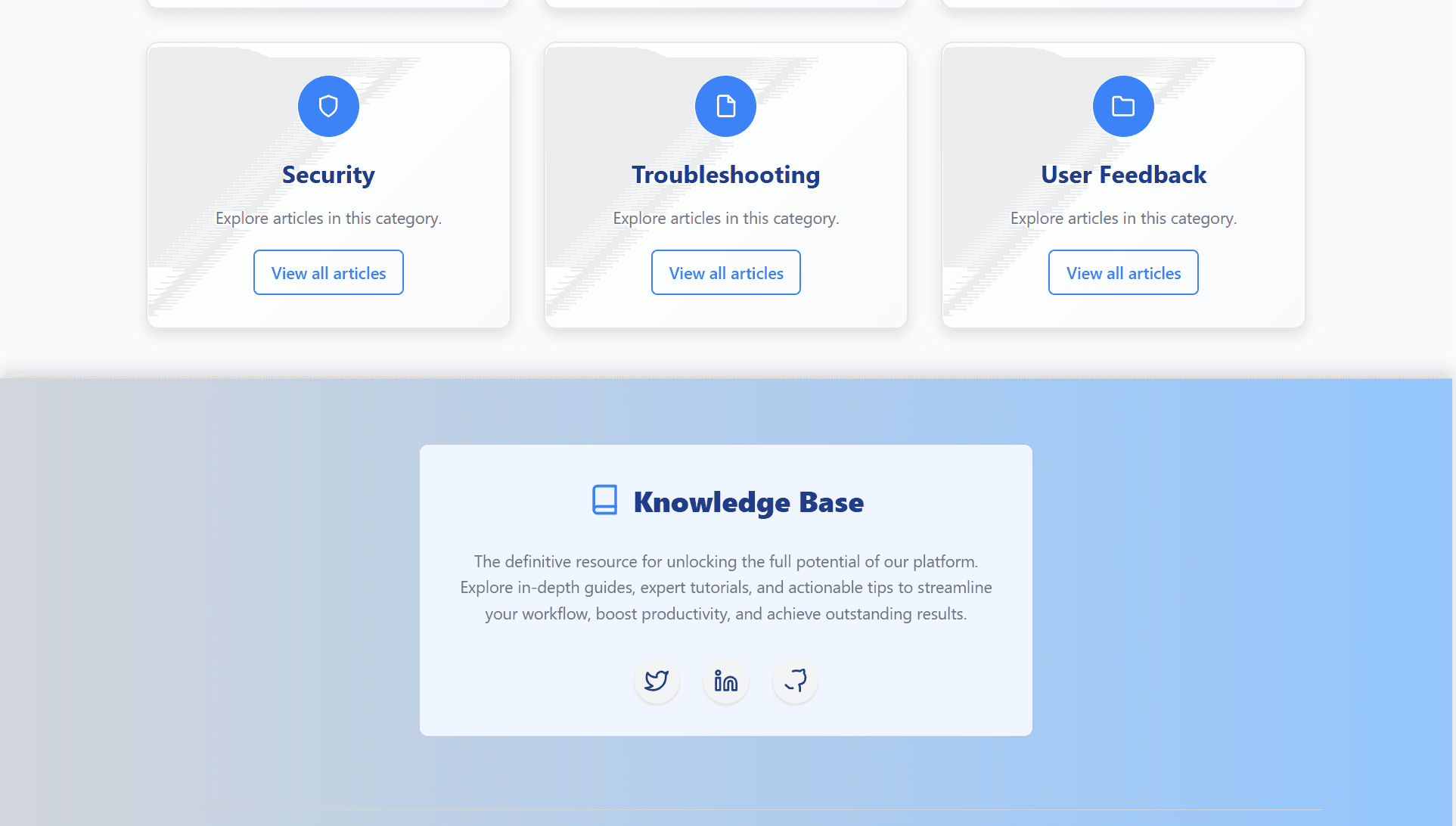
- Category-first structure: articles are grouped into categories such as Security, Troubleshooting and User Feedback, each with its own article listing.
- A full article lifecycle: every article is Active, Archived or Deleted, and admins move it between those states.
- Role-based access for Admin and Customer: each role has its own dashboard and its own permissions.
- Search and filters by keyword, category or status, with results and status changes updated over AJAX without a page reload.
- Security throughout: protection against SQL injection, XSS and unauthorised access on every form and page.
- A responsive Bootstrap interface for reading articles on any screen size.
Challenges and how I solved them
Retiring an article without losing it
- Problem
- A hard delete is final, and in a knowledge base the article removed today is sometimes the one a customer still has bookmarked tomorrow. Keeping everything visible is no better, because outdated instructions do more harm than no instructions.
- Solution
- Articles carry a status instead of being removed from the table. Archived articles drop out of the customer view but stay available to admins, and Deleted works as a holding state that can still be reviewed. Customer-facing queries only return Active articles, so an article disappears for readers the moment it is archived.
Keeping customers out of admin pages
- Problem
- In a PHP app each page is its own entry point. Forget the permission check on one admin page and a customer who guesses the URL can open it; hiding the link in the menu protects nothing.
- Solution
- Every admin page begins with the same check against the role held in the server-side session and redirects anyone without the Admin role before any data is loaded. Passwords are stored as hashes, and the session id is regenerated at login so an old session cannot be reused.
Fast search on plain MySQL
- Problem
- Readers expect search to respond straight away, but the project runs on MySQL alone, and a query with several optional filters is easy to write badly or unsafely.
- Solution
- The search endpoint builds its WHERE clause only from the filters actually set, binds each as a parameter, and returns results over AJAX so only the list redraws. Indexes on the category and status columns keep filtered queries cheap.
Results
The finished system gives admins one place to write, organise and retire articles, and gives readers a category-first way in, shown in the screenshot as cards for Security, Troubleshooting and User Feedback. Archived content stops cluttering what readers see, and nothing an admin removes is gone until they decide it should be.
Role-based access appears in several of my projects, and the same idea changes shape with the stack. Here it is two roles enforced through PHP sessions on each page; in the MERN team management system with three roles it moves into Express middleware and a signed JWT.
What's next
The next steps would be version history for each article, so edits can be compared and rolled back, and MySQL full-text search that ranks results by relevance. Rebuilding the reader side as a single-page app, along the lines of my Vue.js job board, would also make moving between categories faster.